窗口事件
回调函数的准备
我们之前已经做好了有关鼠标,键盘的一些事件,本次就是来对这些事件进行处理,让我在窗口上操作这些事件的时候能有反应。
在Windows.h中有这样一句代码:using EventCallbackFn = std::function<void(Event&)>;,这是一个事件回调函数,有点像委托,EventCallbackFn接受一个Event&参数,里面装了一个函数,这个函数的返回值应该是void。然后我们往里面传函数,比如EventCallbackFn A = Function;,并且Function是一个void返回值函数,声明语句为void Function(Event& e),当我们有Event a{10};,再使用A(a);相当于有了一个Event事件a,其中包含了参数10,然后我们将这个Event事件a传给了回调函数A中,那么回调函数A就会接受这个事件a,同时将a中的参数10传给A里面包含Function。
我们需要进行回调函数的处理,在Application.cpp中做添加,用SetEventCallback()这个函数来将符合EventCallbackFn签名的代码注册到Windows对象中。
Application.cpp
Application::Application()
{
    m_Window = std::unique_ptr<Window>(Window::Create());
    m_Window->SetEventCallback();
}在Application.h中添加语句void OnEvent(Event& e);,这段语句放在public中,同时在application.cpp中写好:void Application::OnEvent(Event& e){}。同时我们定义一个宏用来做事件管理:
Application.cpp
#include "hzpch.h"
#include "Application.h"

#include "Hazel/Events/ApplicationEvent.h"
#include "Hazel/Log.h"

#include<GLFW/glfw3.h>

namespace Hazel
{
#define BIND_EVENT_FN(x) std::bind(&Application::x, this, std::placeholders::_1)

    Application::Application()
    {
        m_Window = std::unique_ptr<Window>(Window::Create());
        m_Window->SetEventCallback(BIND_EVENT_FN(OnEvent));
    }

    Application::~Application()
    {
    }

    void Application::OnEvent(Event& e)
    {

    }

    void Application::Run()
    {
        while (m_Running)
        {
            glClearColor(1, 0, 1, 1);
            glClear(GL_COLOR_BUFFER_BIT);
            m_Window->OnUpdate();
        }
    }
}
#define BIND_EVENT_FN(x) std::bind(&Application::x, this, std::placeholders::_1参数有三,第一个是类成员函数指针,第二个this提供了隐式参数Applicatiion*,第三个则是预留将来调用者传来的Event&。
tips:
std::bind
template``<` `class` `R``,` `class` `F``,` `class``... Args >
/*unspecified*/`_ `bind``( F&& f, Args&&... args )
bind绑定类成员函数时,第一个参数表示对象的成员函数的指针,第二个参数表示对象的地址。
std::bind将可调用对象与其参数一起进行绑定,绑定后的结果可以使用std::function保存。
void Application::OnEvent(Event& e)

{
	HZ_CORE_INFO("{0}", e);
}
GLFW与Hazel的回调互动
在Windowswindow.cpp中我们开始编写以下代码,首先引入之前没有用到的头文件:
Windowswindow.cpp
#include "Hazel/Events/ApplicationEvent.h"
#include "Hazel/Events/MouseEvent.h"
#include "Hazel/Events/KeyEvent.h"随后我们开始编写有关于窗口的回调函数,编写在Init()函数中:
Windowswindow.cpp
//Set GLFW callbacks
glfwSetWindowSizeCallback(m_Window, [](GLFWwindow* window, int width, int height)
        {
                WindowData& data = *(WindowData*)glfwGetWindowUserPointer(window);
                data.Width = width;
                data.Height = height;

                WindowResizeEvent event(width, height);
                data.EventCallback(event);
        });

glfwSetWindowCloseCallback(m_Window, [](GLFWwindow* window)
        {
                WindowData& data = *(WindowData*)glfwGetWindowUserPointer(window);
                WindowCloseEvent event;
                data.EventCallback(event);

        });
其目的是为了让GLFW回调与Hazel引擎回调能够在一起,让 GLFW 抓到的事件能顺利流进 Hazel 的事件体系。
Windowswindow.cpp
glfwSetKeyCallback(m_Window, [](GLFWwindow* window, int key, int scancode, int action, int mods)
        {
                WindowData& data = *(WindowData*)glfwGetWindowUserPointer(window);

                switch (action)
                {
                        case GLFW_PRESS:
                        {
                                KeyPressedEvent event(key, 0);
                                data.EventCallback(event);
                                break;
                        }
                        case GLFW_RELEASE:
                        {
                                KeyReleasedEvent event(key);
                                data.EventCallback(event);
                                break;
                        }
                        case GLFW_REPEAT:
                        {
                                KeyPressedEvent event(key, 1);
                                data.EventCallback(event);
                                break;
                        }
                }

        });
这是有关于键盘回调的部分,因为涉及到GLFW本身的一些码,我们要将其转化为自己的的,所以这一块其实是还包含了键盘事件的转码器。
KeyPressedEvent event(key, 0/1);,0/1分别表示首次按下和持续按住产生的重复字符。
KeyReleasedEvent event(key);,则是只需要键码,没有重复概念。
Windowwindow.cpp
glfwSetScrollCallback(m_Window, [](GLFWwindow* window, double xOffset, double yOffset)
        {
                WindowData& data = *(WindowData*)glfwGetWindowUserPointer(window);

                MouseScrolledEvent event((float)xOffset, (float)yOffset);
                data.EventCallback(event);
        });

glfwSetCursorPosCallback(m_Window, [](GLFWwindow* window, double xPos, double yPos)
        {
                WindowData& data = *(WindowData*)glfwGetWindowUserPointer(window);

                MouseMovedEvent event((float)xPos, (float)yPos);
                data.EventCallback(event);
        });
这些是有关于鼠标操作的。
同时在Init()中设置有关于错误回调的内容:
Windowwindow.cpp
if (!s_GLFWInitialized)
{
        int success = glfwInit();
        HZ_CORE_ASSERT(success, "Could notintialize GLFW!");
        glfwSetErrorCallback(GLFWErrorCallback);
        s_GLFWInitialized = true;

        m_Window = glfwCreateWindow((int)props.Width, (int)props.Height, m_Data.Title.c_str(), nullptr, nullptr);
        glfwMakeContextCurrent(m_Window);
        glfwSetWindowUserPointer(m_Window, &m_Data);
        SetVSync(true);
}
在顶上找个地方定义错误回调函数:
Windowwindow.cpp
static bool s_GLFWInitialized = false;

static void GLFWErrorCallback(int error, const char* description)
{
        HZ_CORE_ERROR("GLFW Error ({0}): {1}", error, description);
}
(可能会有有关于fmt的报错,把Application.cpp中的HAZEL_INFO中的e改为e.ToString()就可以了)
哦这里我好像写漏了,要在Application.cpp里面写个东西:
Application.cpp
void Application::OnEvent(Event& e)
{
    HZ_CORE_INFO("{0}", e.ToString());
}
后来的工作
Application.cpp
void Application::OnEvent(Event& e)
{
    EventDispatcher dispatcher(e);
    dispatcher.Dispatch<WindowCloseEvent>(BIND_EVENT_FN(OnWindowClose));

    HZ_CORE_TRACE("{0}", e.ToString());
}
上述是开始使用事件调度器,一会下面的代码写完,会利用调度器去判断是不是关闭事件,如果是的话就关闭窗口,通过将m_Running设置为false。
写一个用来关闭窗口的函数,在Application.h中
Application.h
class HAZEL_API Application
{
public:
    Application();
    virtual ~Application();

    void Run();

    void OnEvent(Event& e);
private:
    bool OnWindowClose(WindowCloseEvent& e);

    std::unique_ptr<Window> m_Window;
    bool m_Running = true;
};将#include "Hazel/Events/ApplicationEvent.h"从Application.cpp移动到Application.h
运行结果:
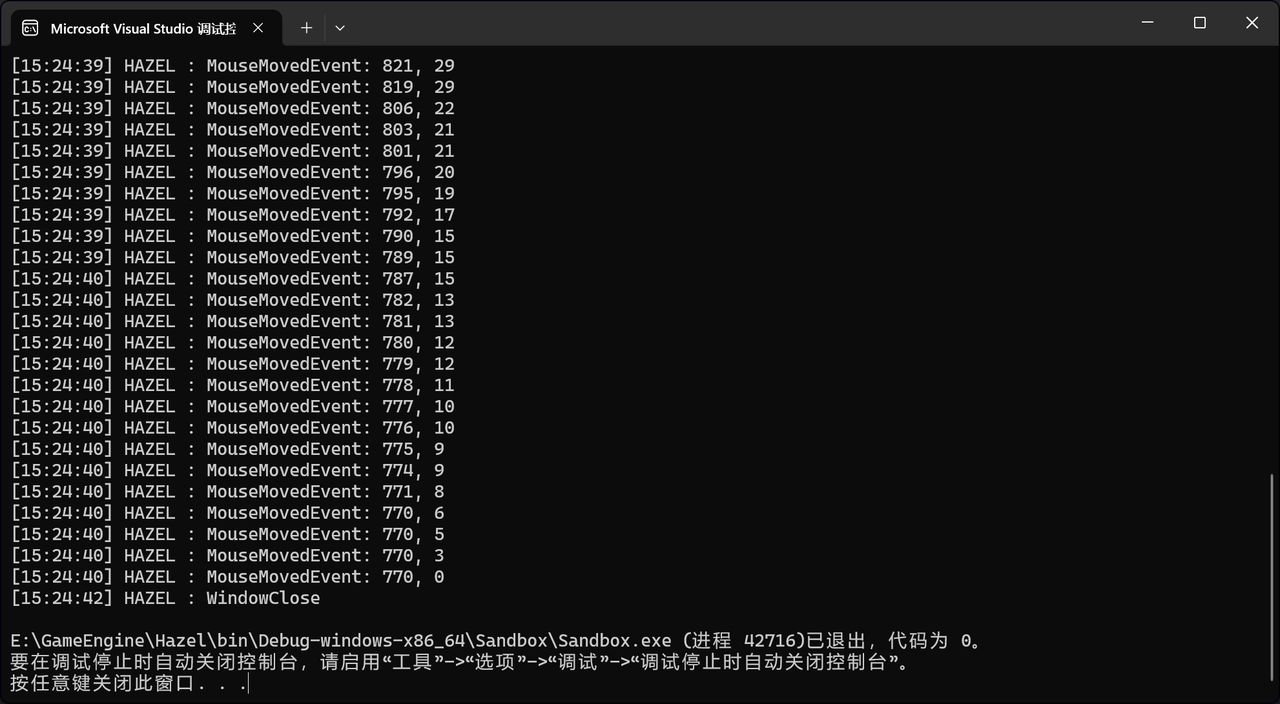
可以通过关闭了。